vSphere audit trail with Log Insight
Had a talk with a former colleague of mine, a month or two ago, about a customer that wished to use Log Insight to do audit trail of there vSphere environment and if this was possible. My first reaction was I couldn't see why it shouldn't be possible to do audit trail with Log Insight. I mean it's getting it's logs from the different logs in a VMware environment so it should be pretty easy.
A week or so later I had a moment and looked into if it was indeed possible - As it turns out it is, I think I used around 30 min. for finding the right fields to include.
So the way it work is that I check to see if two field exist and matches on the appname "shell", meaning ESXi shell commands executed and if ANY of them is a match it's include in the search.
Log Insight audit trail explained
The field are as follows
"vmw_vc_auth_user" - This catches login events, with username and source ip address."appname" - This is set to "shell", so that we can catch all commands executed via ESXi shell. "vc_username" - This catches all the events a user executes, this is equal to the events tab in the vSphere client.
With this you should be able to see, who logged in, from where and what they did (and obviously also when).
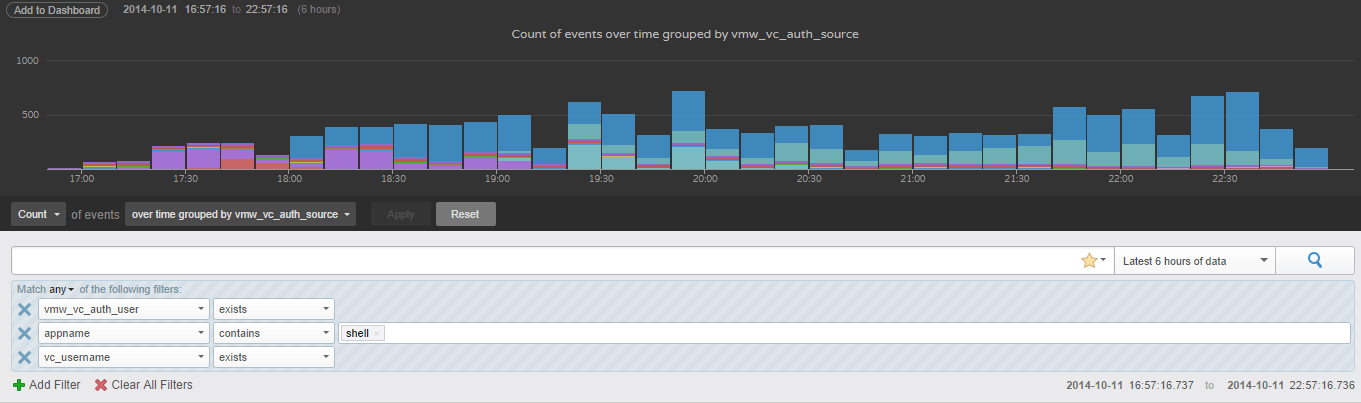
The only thing left now is to find a useful way to plot the data - Guess why the color changes in the graph doing off peak hours - You guessed it, backup jobs are starting. If you want to narrow down your search, it should go with out saying, you just type in the info (ip, username, command, event etc.) that triggered your need to do an audit trail, to help you find the needle.
Happy hunting